

Use Free XK0-005 Exam Questions that Stimulates Actual EXAM
Get 100% Real XK0-005 Free Online Practice Test
CompTIA XK0-005 exam is a certification exam designed for individuals who want to demonstrate their knowledge and skills in Linux administration. XK0-005 exam is the latest version of the CompTIA Linux+ certification and is aimed at IT professionals who are interested in pursuing a career in Linux system administration. XK0-005 exam covers a wide range of topics, including system configuration, management, security, and troubleshooting, among others.
NEW QUESTION # 97
User1 is a member of the accounting group. Members of this group need to be able to execute but not make changes to a script maintained by User2. The script should not be accessible to other users or groups. Which of the following will give proper access to the script?
- A. chown accounting:user1 script.sh
chmod 057 script.sh - B. chown user1:accounting script.sh
chmod 777 script.sh - C. chown user2:accounting script.sh
chmod u+x script.sh - D. chown user2:accounting script.sh
chmod 750 script.sh
Answer: D
Explanation:
Explanation
The commands that will give proper access to the script are:
chown user2:accounting script.sh: This command will change the ownership of the script to user2 as the owner and accounting as the group. The chown command is a toolfor changing the owner and group of files and directories on Linux systems. The user2:accounting is the user and group name that the command should assign to the script. The script.sh is the name of the script that the command should modify. The command chown user2:accounting script.sh will ensure that user2 is the owner of the script and accounting is the group of the script, which will allow user2 to maintain the script and the accounting group to access the script.
chmod 750 script.sh: This command will change the permissions of the script to 750, which means read, write, and execute for the owner; read and execute for the group; and no access for others.
The chmod command is a tool for changing the permissions of files and directories on Linux systems.
The permissions are represented by three digits in octal notation, where each digit corresponds to the owner, group, and others. Each digit can have a value from 0 to 7, where each value represents a combination of read, write, and execute permissions. The 750 is the permission value that the command should assign to the script. The script.sh is the name of the script that the command should modify. The command chmod 750 script.sh will ensure that only the owner and the group can execute the script, but not make changes to it, and that the script is not accessible to other users or groups.
The commands that will give proper access to the script are chown user2:accounting script.sh and chmod 750 script.sh. This is the correct answer to the question. The other options are incorrect because they either do not give proper access to the script (chown user1:accounting script.sh or chown accounting:user1 script.sh) or do not change the permissions of the script (chmod 777 script.sh or chmod u+x script.sh). References: CompTIA Linux+ (XK0-005) Certification Study Guide, Chapter 11: Managing File Permissions and Ownership, pages
346-348.
NEW QUESTION # 98
A systems administrator detected corruption in the /data filesystem. Given the following output:
Which of the following commands can the administrator use to best address this issue?
- A. umount /data
xfs repair /dev/ sdcl
mount /data - B. umount /data
fsck /dev/ sdcl
mount / data - C. umount /data
pvs /dev/sdcl
mount /data - D. umount /data
mkfs . xfs /dev/sclcl
mount /data
Answer: A
Explanation:
Explanation
The xfs repair command is used to check and repair an XFS filesystem, which is the type of filesystem used for the /data partition, as shown in the output. The administrator needs to unmount the /data partition before running the xfs repair command on it, and then mount it back after the repair is done. For example: umount
/data; xfs_repair /dev/sdcl; mount /data. The mkfs.xfs command is used to create a new XFS filesystem, which would erase all the data on the partition. The fsck command is used to check and repair other types of filesystems, such as ext4, but not XFS. The pvs command is used to display information about physical volumes in a logical volume manager (LVM) setup, which is not relevant for this issue.
NEW QUESTION # 99
A Linux administrator needs to analyze a failing application that is running inside a container. Which of the following commands allows the Linux administrator to enter the running container and analyze the logs that are stored inside?
- A. docker exec -d app /bin/bash
- B. podman run -d app /bin/bash
- C. podman exec -ti app /bin/sh
- D. docker run -ti app /bin/sh
Answer: C
NEW QUESTION # 100
A junior Linux administrator is tasked with installing an application. The installation guide states the application should only be installed in a run level 5 environment.
Which of the following commands would ensure the server is set to runlevel 5?
- A. systemctl isolate network.target
- B. systemctl isolate graphical.target
- C. systemctl isolate basic.target
- D. systemctl isolate multi-user.target
Answer: B
Explanation:
Explanation
The command that would ensure the server is set to runlevel 5 is systemctl isolate graphical.target. This command will change the current target (or runlevel) of systemd to graphical.target, which is equivalent to runlevel 5 in SysV init systems. Graphical.target means that the system will start with a graphical user interface (GUI) and all services required for it.
The other options are not correct commands for setting the server to runlevel 5. The systemctl isolate multi-user.target command will change the current target to multi-user.target, which is equivalent to runlevel 3 in SysV init systems. Multi-user.target means that the system will start with multiple user logins and networking, but without a GUI. The systemctl isolate network.target command will change the current target to network.target, which is not a real runlevel but a synchronization point for network-related services.
Network.target means that network functionality should be available, but does not specify whether it should be started before or after it. The systemctl isolate basic.target command will change the current target to basic.target, which is also not a real runlevel but a synchronization point for basic system services. Basic.target means that all essential services should be started, but does not specify whether it should be started before or after it. References: systemd System and Service Manager; systemd.special(7) - Linux manual page
NEW QUESTION # 101
Several users reported that they were unable to write data to the /oracle1 directory. The following output has been provided:
Which of the following commands should the administrator use to diagnose the issue?
- A. fdisk -1 /dev/sdb1
- B. du -sh /oracle1
- C. lsblk /dev/sdb1
- D. df -i /oracle1
Answer: D
Explanation:
The administrator should use the command df -i /oracle1 to diagnose the issue of users being unable to write data to the /oracle1 directory. This command will show the inode usage of the /oracle1 filesystem, which indicates how many files and directories can be created on it. If the inode usage is 100%, it means that no more files or directories can be added, even if there is still free space on the disk. The administrator can then delete some unnecessary files or directories, or increase the inode limit of the filesystem, to resolve the issue.
The other options are not correct commands for diagnosing this issue. The fdisk -l /dev/sdb1 command will show the partition table of /dev/sdb1, which is not relevant to the inode usage. The lsblk /dev/sdb1 command will show information about /dev/sdb1 as a block device, such as its size, mount point, and type, but not its inode usage. The du -sh /oracle1 command will show the disk usage of /oracle1 in human-readable format, but not its inode usage. Reference: CompTIA Linux+ (XK0-005) Certification Study Guide, Chapter 7: Managing Disk Storage; How to Check Inode Usage in Linux - Fedingo
NEW QUESTION # 102
A systems administrator is encountering performance issues. The administrator runs 3 commands with the following output
The Linux server has the following system properties
CPU: 4 vCPU
Memory: 50GB
Which of the following accurately describes this situation?
- A. The system is under CPU pressure and will require additional vCPUs
- B. The system requires more memory
- C. Too many users are currently logged in to the system
- D. The system has been running for over a year and requires a reboot.
Answer: A
Explanation:
Explanation
Based on the output of the image sent by the user, the system is under CPU pressure and will require additional vCPUs. The output shows that there are four processes running upload.sh scripts that are consuming a high percentage of CPU time (99.7%, 99.6%, 99.5%, and 99.4%). The output also shows that the system has only 4 vCPUs, which means that each process is using almost one entire vCPU. This indicates that the system is struggling to handle the CPU load and may experience performance issues or slowdowns. Adding more vCPUs to the system would help to alleviate the CPU pressure and improve the system performance. The system has not been running for over a year, as the uptime command shows that it has been up for only 1 day,
2 hours, and 13 minutes. The number of users logged in to the system is not relevant to the performance issue, as they are not consuming significant CPU resources. The system does not require more memory, as the free command shows that it has plenty of available memory (49 GB total, 48 GB free). References: CompTIA Linux+ (XK0-005) Certification Study Guide, Chapter 15: Managing Memory and Process Execution, pages
468-469.
NEW QUESTION # 103
A Linux administrator is scheduling a system job that runs a script to check available disk space every hour.
The Linux administrator does not want users to be able to start the job. Given the following:
The Linux administrator attempts to start the timer service but receives the following error message:
Which of the following is MOST likely the reason the timer will not start?
- A. The checkdiskspace.timer unit should be enabled via systemct1.
- B. The checkdiskspace.timer should be configured to allow manual starts.
- C. The checkdiskspace.timer should be started using the sudo command.
- D. The timers.target should be reloaded to get the new configuration.
Answer: B
Explanation:
Explanation
The most likely reason the timer will not start is that the checkdiskspace.timer should be configured to allow manual starts. By default, systemd timers do not allow manual activation via systemct1 start, unless they have RefuseManualStart=no in their [Unit] section. This option prevents users from accidentally starting timers that are meant to be controlled by other mechanisms, such as calendar events or dependencies. To enable manual starts for checkdiskspace.timer, the administrator should add RefuseManualStart=no to its [Unit] section and reload systemd.
The other options are not correct reasons for the timer not starting. The checkdiskspace.timer unit does not need to be enabled via systemct1 enable, because enabling a timer only makes it start automatically at boot time or after a system reload, but does not affect manual activation. The timers.target does not need to be reloaded to get the new configuration, because reloading a target only affects units that have a dependency on it, but does not affect manual activation. The checkdiskspace.timer does not need to be started using the sudo command, because the administrator is already running systemct1 as root, as indicated by the # prompt. References: systemd.timer(5) - Linux manual page; systemct1(1) - Linux manual page
NEW QUESTION # 104
Junior system administrator had trouble installing and running an Apache web server on a Linux server. You have been tasked with installing the Apache web server on the Linux server and resolving the issue that prevented the junior administrator from running Apache.
INSTRUCTIONS
Install Apache and start the service. Verify that the Apache service is running with the defaults.
Typing "help" in the terminal will show a list of relevant event commands.
If at any time you would like to bring back the initial state of the simulation, please click the Reset All button.
Answer:
Explanation:
See the explanation below.
Explanation
yum install httpd
systemctl --now enable httpd
systemctl status httpd
netstat -tunlp | grep 80
pkill <processname>
systemctl restart httpd
systemctl status httpd
NEW QUESTION # 105
A Linux administrator wants to find out whether files from the wget package have been altered since they were installed. Which of the following commands will provide the correct information?
- A. rpm -qf wget
- B. rpm -V wget
- C. rpm -F wget
- D. rpm -i wget
Answer: B
Explanation:
Explanation
The command that will provide the correct information about whether files from the wget package have been altered since they were installed is rpm -V wget. This command will use the rpm utility to verify an installed RPM package by comparing information about the installed files with information from the RPM database.
The verification process can check various attributes of each file, such as size, mode, owner, group, checksum, capabilities, and so on. If any discrepancies are found, rpm will report them using a single letter code for each attribute.
The other options are not correct commands for verifying an installed RPM package. The rpm -i wget command is invalid because -i is used to install a package from a file, not to verify an installed package. The rpm -qf wget command will query which package owns wget as a file name or path name, but it will not verify its attributes. The rpm -F wget command will freshen (upgrade) an already installed package with wget as a file name or path name, but it will not verify its attributes. References: rpm(8) - Linux manual page; Using RPM to Verify Installed Packages
NEW QUESTION # 106
The security team has identified a web service that is running with elevated privileges A Linux administrator is working to change the systemd service file to meet security compliance standards. Given the following output:
Which of the following remediation steps will prevent the web service from running as a privileged user?
- A. Updating the Environment File line in the [Service] section to/home/webservice/config
- B. Changing the:nulti-user.target in the [Install] section to basic.target
- C. Adding the User-webservice to the [Service] section of the service file
- D. Removing the ExecStarWusr/sbin/webserver -D SOPTIONS from the service file
Answer: D
NEW QUESTION # 107
Users are experiencing high latency when accessing a web application served by a Linux machine. A systems administrator checks the network interface counters and sees the following:
Which of the following is the most probable cause of the observed latency?
- A. A connection problem exists on the network interface.
- B. No IP address is assigned to the interface.
- C. The gateway is unreachable.
- D. The network interface is disconnected.
Answer: A
Explanation:
Explanation
The high number of errors and dropped packets in the output of the network interface counters indicate a connection problem on the network interface.
References:
CompTIA Linux+ (XK0-005) Certification Study Guide, Chapter 10: Managing Networking, Section:
Troubleshooting Network Issues, Page 359.
Linux+ (Plus) Certification, Exam Objectives: 4.3 Given a scenario, troubleshoot and resolve basic network configuration and connectivity issues.
NEW QUESTION # 108
A new drive was recently added to a Linux system. Using the environment and tokens provided, complete the following tasks:
* Create an appropriate device label.
* Format and create an ext4 file system on the new partition.
The current working directory is /.
Answer:
Explanation:
Explanation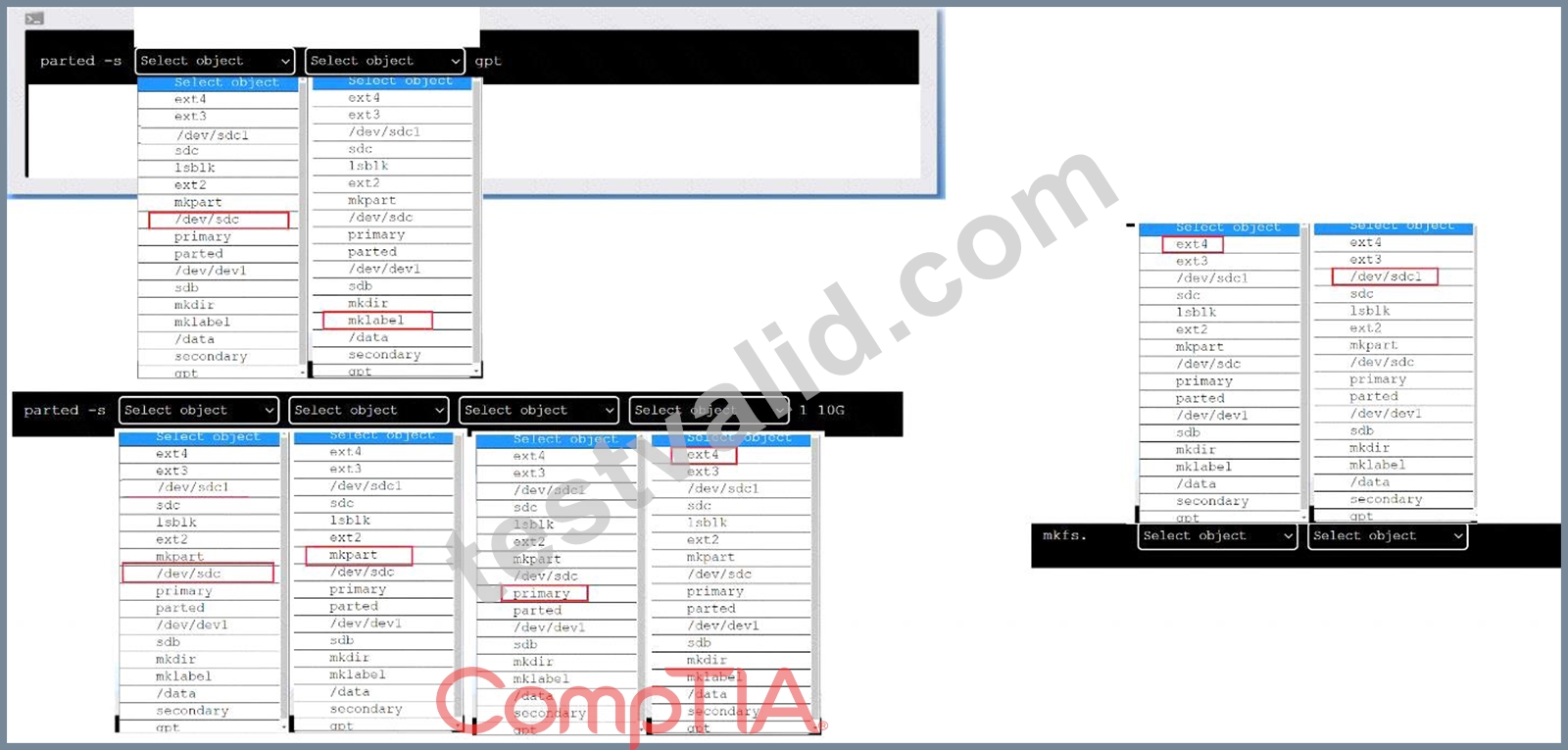
To create an appropriate device label, format and create an ext4 file system on the new partition, you can use the following commands:
To create a GPT (GUID Partition Table) label on the new drive /dev/sdc, you can use thepartedcommand with the-soption (for script mode), the device name (/dev/sdc), themklabelcommand, and the label type (gpt). The command is:
parted -s /dev/sdc mklabel gpt
To create a primary partition of 10 GB on the new drive /dev/sdc, you can use thepartedcommand with the-soption, the device name (/dev/sdc), themkpartcommand, the partition type (primary), the file system type (ext4), and the start and end points of the partition (1 and 10G). The command is:
parted -s /dev/sdc mkpart primary ext4 1 10G
To format and create an ext4 file system on the new partition /dev/sdc1, you can use themkfscommand with the file system type (ext4) and the device name (/dev/sdc1). The command is:
mkfs.ext4 /dev/sdc1
You can verify that the new partition and file system have been created by using thelsblkcommand, which will list all block devices and their properties.
NEW QUESTION # 109
Which of the following commands will display the operating system?
- A. uname -n
- B. uname -s
- C. uname -m
- D. uname -o
Answer: D
Explanation:
The command that will display the operating system is uname -o. This command uses the uname tool, which is used to print system information such as the kernel name, version, release, machine, and processor. The -o option stands for operating system, and prints the name of the operating system implementation (usually GNU/Linux).
The other options are not correct commands for displaying the operating system. The uname -n command will display the network node hostname of the system. The uname -s command will display the kernel name of the system. The uname -m command will display the machine hardware name of the system. Reference: CompTIA Linux+ (XK0-005) Certification Study Guide, Chapter 1: Exploring Linux Command-Line Tools; uname(1) - Linux manual page
NEW QUESTION # 110
Some servers in an organization have been compromised. Users are unable to access to the organization's web page and other services. While reviewing the system log, a systems administrator notices messages from the kernel regarding firewall rules:
Which of the following commands will remediate and help resolve the issue?
- A.

- B.

- C.

- D.

Answer: D
Explanation:
Explanation
The command iptables -F will remediate and help resolve the issue. The issue is caused by the firewall rules that block the access to the organization's web page and other services. The output of dmesg | grep firewall shows that the kernel has dropped packets from the source IP address 192.168.1.100 to the destination port 80, which is the default port for HTTP. The command iptables -F will flush all the firewall rules and allow the traffic to pass through. This command will resolve the issue and restore the access to the web page and other services. The other options are incorrect because they either do not affect the firewall rules (ip route flush or ip addr flush) or do not exist (iptables -R). References: CompTIA Linux+ (XK0-005) Certification Study Guide, Chapter 18: Securing Linux Systems, page 543.
NEW QUESTION # 111
A Linux administrator is troubleshooting the root cause of a high CPU load and average.
Which of the following commands will permanently resolve the issue?
- A. kill -9 6295
- B. pstree -p 6295
- C. renice -n -20 6295
- D. iostat -cy 1 5
Answer: A
Explanation:
Explanation
The command that will permanently resolve the issue of high CPU load and average is kill -9 6295. This command will send a SIGKILL signal to the process with the PID 6295, which is the process that is consuming 99.7% of the CPU according to the top output. The SIGKILL signal will terminate the process immediately and free up the CPU resources. The kill command is used to send signals to processes by PID or name.
The other options are not correct commands for resolving this issue. The renice -n -20 6295 command will change the priority (niceness) of the process with PID 6295 to -20, which is the highest priority possible. This will make the process more CPU-intensive, not less. The renice command is used to change the priority of running processes. The pstree -p 6295 command will show a tree of processes with PID 6295 as the root. This will not affect the CPU load or average, but only display information. The pstree command is used to display a tree of processes. The iostat -cy 1 5 command will show CPU and disk I/O statistics for 5 iterations with an interval of 1 second. This will also not affect the CPU load or average, but only display information. The iostat command is used to report CPU and I/O statistics. References: CompTIA Linux+ (XK0-005) Certification Study Guide, Chapter 11: Troubleshooting Linux Systems; kill(1) - Linux manual page; renice(1) - Linux manual page; pstree(1) - Linux manual page; iostat(1) - Linux manual page
NEW QUESTION # 112
A Linux systems administrator is configuring a new filesystem that needs the capability to be mounted persistently across reboots. Which of the following commands will accomplish this task? (Choose two.)
- A. mkfs.ext4 /dev/sdc1
- B. echo "/dev/sdc1 /data ext4 defaults 0 0" >> /etc/fstab
- C. fsck /dev/sdc1
- D. df -h /data
- E. echo "/data /dev/sdc1 ext4 defaults 0 0" >> /etc/fstab
- F. fdisk -l /dev/sdc1
Answer: A,B
Explanation:
"modify the /etc/fstab text file to automatically mount the new partition by opening it in an editor and adding the following line:
/dev/ xxx 1 /data ext4 defaults 1 2
where xxx is the device name of the storage device"
https://learning.oreilly.com/library/view/mastering-linux-system/9781119794455/b01.xhtml
NEW QUESTION # 113
......
The XK0-005 exam is intended for IT professionals who have experience in Linux system administration and are seeking to validate their skills and knowledge. XK0-005 exam covers a broad range of topics, including system architecture, Linux installation and package management, GNU and Unix commands, devices, filesystems, and file hierarchy standards.
To pass the CompTIA XK0-005 exam, candidates must have a thorough understanding of Linux operating systems, its commands, and its various features. They must also have hands-on experience with Linux systems to answer the exam questions correctly. XK0-005 exam consists of multiple-choice questions, performance-based questions, and drag-and-drop questions, and candidates are given 90 minutes to complete the exam. Passing the exam requires a score of 720 out of 900. Overall, the CompTIA XK0-005 exam is a challenging but rewarding certification that can open up many opportunities for Linux professionals.
BEST Verified CompTIA XK0-005 Exam Questions (2024) : https://lead2pass.testvalid.com/XK0-005-valid-exam-test.html